What Can You Brand on a Photo Booth? Prints, Screens and Backdrops
Plan a branded photo booth around the details guests actually see: print templates, screens, backdrops, sharing and the event setup, with a useful briefing checklist.
A branded photo booth can do much more than add a logo to the bottom of a picture. The backdrop, welcome screen, print layout and way guests receive their photographs all affect how the experience feels. The useful starting question is not how many logos will fit. It is what you want people to do: take a team photograph, remember an awards evening, try a product or leave with a keepsake that belongs to your event.
Not every booth supports the same customisation, and a self-setup pod is different from a fully attended installation. Start with the event, venue and audience, then choose the format and branding that suit them. The final proposal should confirm exactly which elements are included.
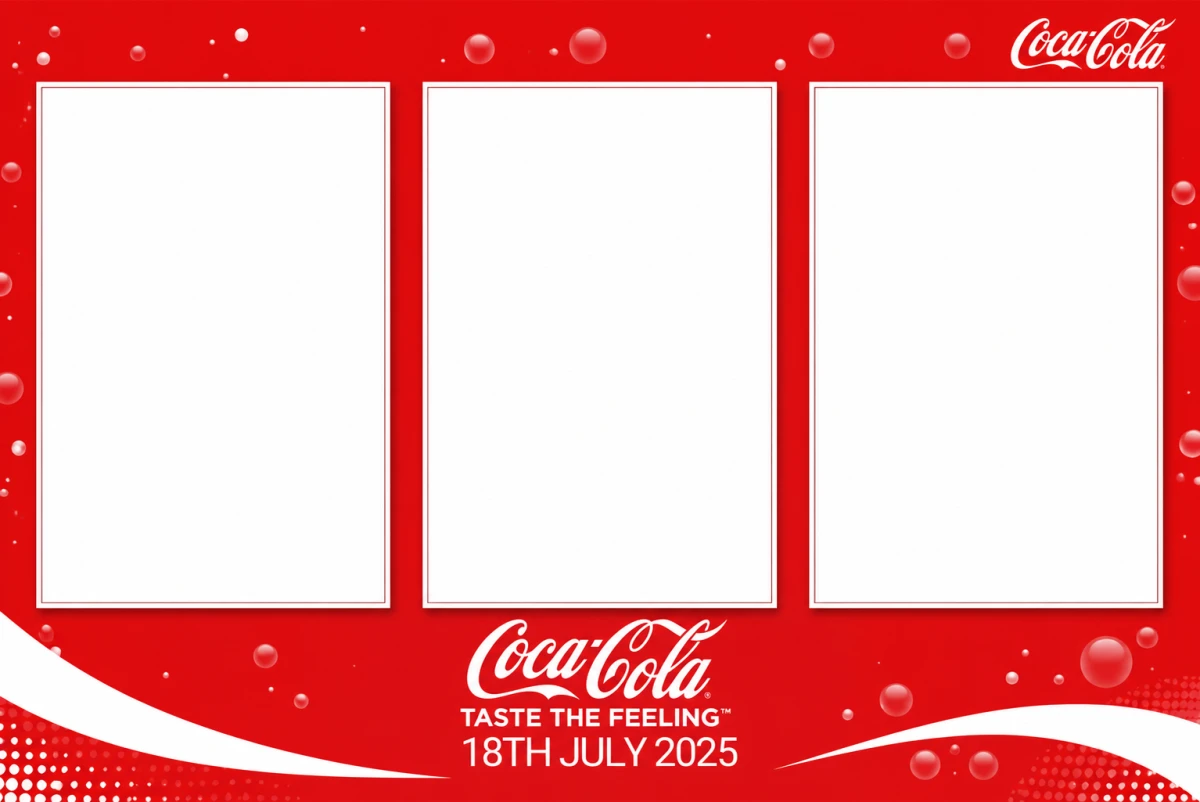
The main places your branding can appear
| Element | What to consider | What to confirm |
|---|---|---|
| Photo or print template | Logo, colours, event title, date and the space around each photograph. | The agreed layout, print format and digital version. |
| Guest-facing screen | A welcome message or design that introduces the experience. | Which screens can be personalised on the chosen booth. |
| Backdrop | A repeated-logo design, campaign artwork or an event-styled setting. | Artwork dimensions, production deadline and available footprint. |
| Digital content | Still photographs, GIFs or video where supported. | The selected capture formats and sharing options. |
| Surrounding setup | Props, welcome signage and the guest approach. | The specific items, installation and staffing in the proposal. |
Print templates: design for a keepsake, not a miniature advert
Guests tend to keep a photograph because they like the picture. Give faces enough room, keep important text readable and choose a layout that works at the actual print size. A large campaign graphic can lose detail when squeezed onto a small template. Equally, a tiny logo might disappear against a busy background. Share your brand guidelines rather than asking the designer to guess your colours or typography.
Ask to see the print layout and digital output separately if both are required. Check names, dates, logo versions and margins before approval. If multiple departments or sponsors need to sign off the design, nominate one person to return the final feedback. Printed photographs and optional additional print quantities should be explicitly listed, rather than assuming unlimited capture means unlimited physical prints.
Screens and capture formats depend on the booth
A personalised welcome screen can make it obvious that guests have found the right activation. Keep instructions short: people should quickly understand where to stand and how to begin. Screen layouts and available interactive features vary by booth, so discuss the intended journey before creating artwork to a guessed specification.
Still photos, animated GIFs, boomerangs and conventional video clips are different outputs, not interchangeable package names. Tell us what your audience is likely to enjoy and where you hope to use the content. We can explain the suitable options for the chosen equipment. Do not assume every mirror, pod or booth includes every video feature.
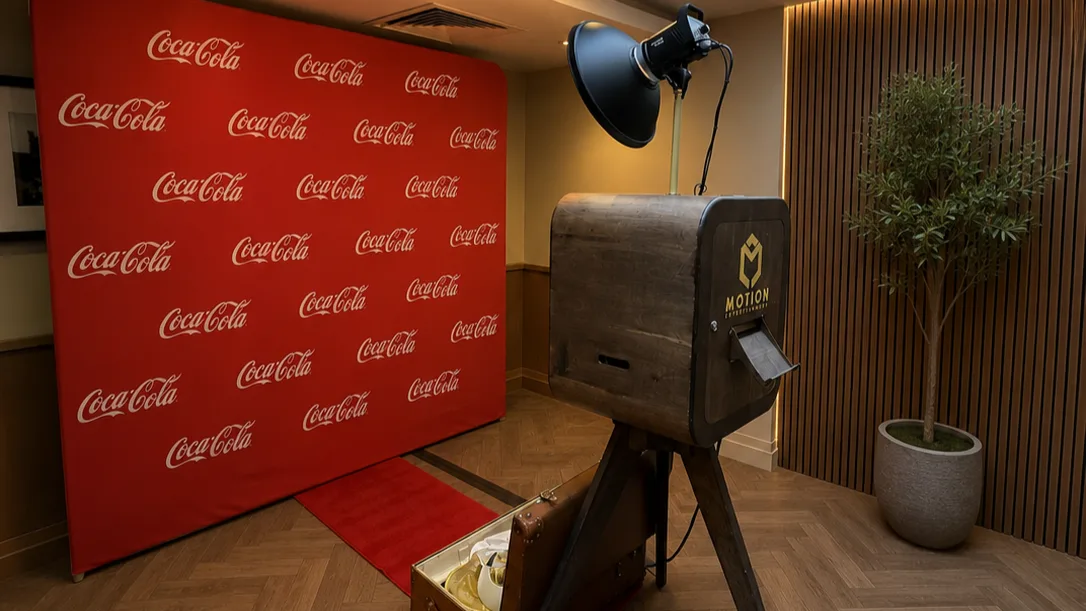
Backdrops need a room plan as well as artwork
Custom printed backdrops can carry repeated logos, a campaign image or a design created for the occasion. Share a room photograph and the proposed location before finalising the scene. The camera, guests, backdrop supports and queue all need usable space. A clear stretch of wall is not necessarily the full footprint available once doors, tables and access routes are considered.
Think about nearby windows, strong coloured venue lighting and what will appear at the edges of a group photograph. Indoors, a considered position can be more effective than simply placing the booth beside the entrance. Any branded physical finish, set piece or additional lighting should be agreed for that installation; a custom template does not automatically mean a complete wrap or bespoke structure.
Decide how guests receive their photographs
Ask which phone-sharing methods are available for your chosen setup, whether they require a working internet connection, and what happens if the venue connection is unreliable. QR codes, email and other delivery options should be confirmed rather than treated as universal features. Also decide whether you want an event gallery and who should be able to access it. Raise public-space or organisational privacy requirements before booking so the proposed approach can be reviewed.
If you want optional surveys, competition entry or customer data capture, include that in the brief from the start. Discuss the proposed information, guest notices and any agreed reporting with your organisation's responsible team. Do not assume photo delivery automatically includes marketing consent or a particular data export.
Send a brief that makes quoting easier
- Event date, venue, guest numbers and the hours the booth should operate.
- Your preferred booth style, available space and whether you need an attendant.
- Logo files, brand guidelines, campaign message and the elements you want personalised.
- Desired photographs, prints or video formats, plus sharing and gallery preferences.
- Venue access times, artwork deadline, approval contact and an indicative budget.
We price branded photo booth hire around your event and the agreed customisation. Send the brief for a tailored proposal; we can work through the design and practical details by email.
Request Your Photo Booth ProposalPrevious
Winter Kids’ Disco Party Checklist: From Hall Booking to Home Time
Next
Karaoke Machine Hire: Wi-Fi, TV Connections and What You Need to Check
Related Posts
Corporate Event Entertainment That Actually Engages Guests
Generic entertainment produces generic results. This guide explains what actually works when you want guests genuinely engaged at corporate events — not just politely in attendance.
Corporate EventsTop Entertainment Ideas for Corporate Events in 2026
The best corporate events in 2026 treat entertainment as a priority, not an afterthought. Here's what's actually working — and what to avoid.